I am facing an issue with the event handler in PrivacyIDEA. I would like to include the following in the HTML email body: Your new token
The goal is for users to be able to click this link and have the token automatically added to their authenticator app. Could you please advise on the correct syntax to make this clickable link work properly?
Hi,
you need to set the mimetype to html and then you can use <a href={googleurl_value}>Your new token</a> in the body to create a clickable link with the token url. If you enroll a push token you need to use the tag {pushurl_value} instead.
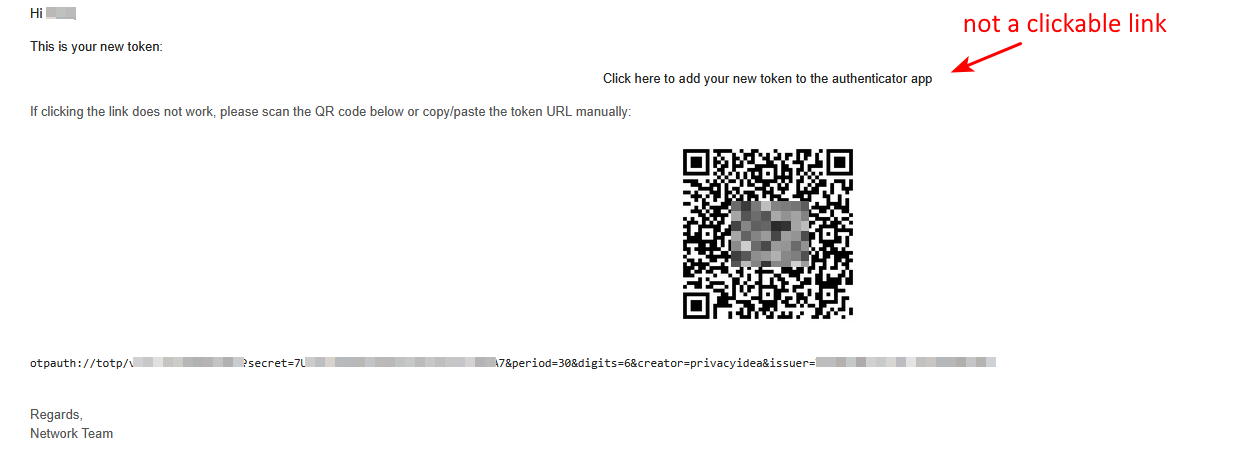
I used <a href={googleurl_value}>Your new token</a> in the body to create a clickable link with the token url. However, it doesn’t seem to work correctly. In the email received by the user, there is no clickable link — it only displays ‘Your new token’ as plain text.
Please help me to point out what is incorrect.
Did you check if the {googleurl_value} tag is replaced correctly by the link (display email as plaintext)?
Which token type are you using?
Is the link working for other users?
I’m using TOTP token type.
The link not working for all users.
The below is my code in the body email:
Hi {username},
 <p>This is your new token:</p>

    <p style="text-align:center;">
        <a href="{googleurl_value}">
        Click here to add your new token to the authenticator app
         </a>
     </p>

    <p style="font-size:13px;color:#555;">
         If clicking the link does not work, please scan the QR code below or copy/paste the token URL manually:
    </p>

    <p style="text-align:center;">
         <img src="cid:token_image" alt="QR Code" width="200">
     </p>

    <p><code>{googleurl_value}</code></p>
Hi, you need to further debug this. Can you check in the mail the user received if the tags are replaced by the link? Instead of <a href="{googleurl_value}" There should stand something like <a href="otpauth://totp/TOTP0006E341?secret=O7ZCM...". If the link is there, it might be an html issue. Otherwise, there might be a misconfiguration in the event handler.
By the way, is the QR code displayed? I think there is no valid tag used.
Maybe some of the css style stuff you originally posted in the link is not supported by your email client. To figure this out, you can try to include a simple link without any styling.
Still it would be helpful to check the mail as plaintext to double check if the part containing the link is valid html code.
I’ve tried using the token link without any styling; however, the issue still persists. Could you please advise me on a valid HTML code template that allow a clickable token link in the email body.
The minimalistic example is <a href={googleurl_value}>Your new token</a>. But your html body is valid html and should work as well. The tags seems to be replaced correctly with the according data by the event handler. So it seems it is an issue with your email client and not with privacyidea. Still checking the mail as plaintext would be a good idea, just to be sure. Otherwise, I have no further idea.